VOLUNTEERING

Everyone was born with unique skills and gifts to play a role in the story of God’s kingdom. Volunteering and serving on a team is one of the best ways to connect in with people in the church.
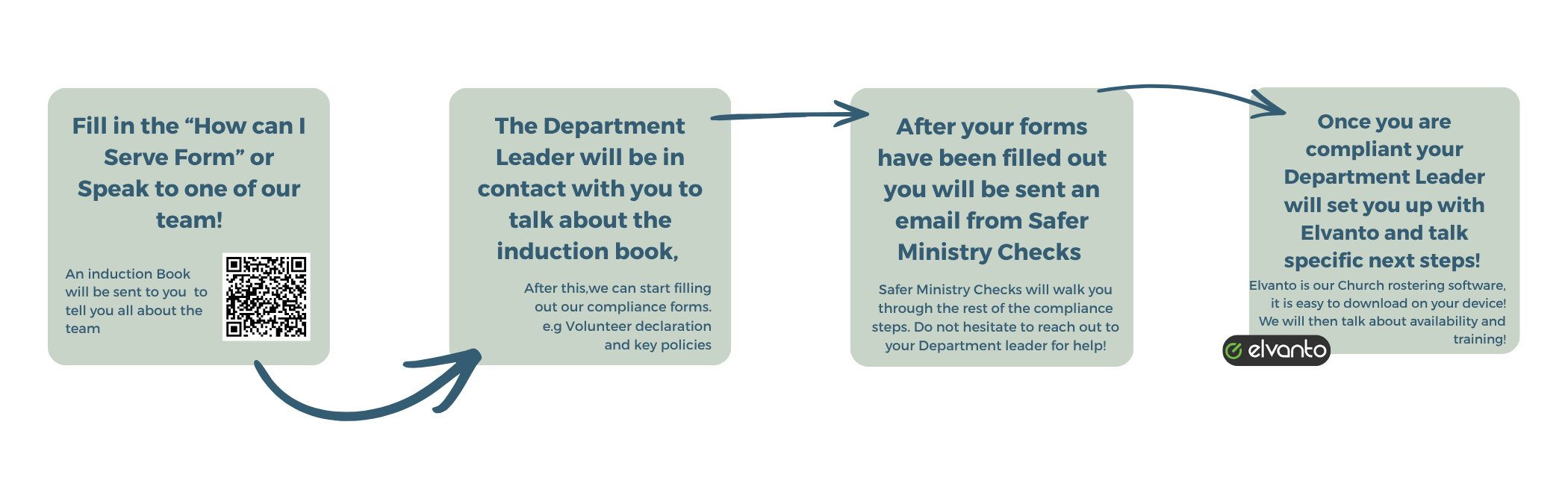
If you interested in serving click “How Can I Serve” and fill out the form. Search below to check our volunteer requirements

  • At Encounter, protecting our volunteers and vulnerable people is our top priority. To fulfill our duty of care, we have a few prerequisites for all of our 18+ volunteers:

    • A signed volunteer’s agreement which contains a ‘Code Of Conduct’ and several legal declarations.

    • A current Working With Children’s Check with Encounter Christian Church listed as an organisation.

    • A recent Police Check.

    • Completing the ‘Volunteer & Leader Training’ online course through Safe Ministry Check, and the refreshers as required.

    • Being added to our Elvanto database, a church management system that we use for rostering our teams.

    If you are younger than 18 years old, then we only need a ‘Volunteers Declaration’ signed by a Parent/Guardian and the creation of an Elvanto account. If you are 17 years old, we recommend beginning the process early to ensure all requirements are met to avoid any complications when you turn 18 signed by a Parent/Guardian and the creation of an Elvanto account.

    If you are 17 years old, we recommend starting the process early to ensure all requirements are met to avoid issues when you turn 18.

  • To complete you volunteer declaration form:

    • Click this link to access the form: VOLUNTEER DECLARATION

      1. This must be printed and completed, Alternatively, ask your team leader for a hard copy

    • Please read through the Code of Conduct found on page two

    • Complete & sign the declaration form

    • Give the physical copy to your team leader

    Your Volunteer Declaration details will be entered into our Elvato and Safe Ministry Check databases.

  • To apply for a new Working with Children Check:

    Before you begin:

    You must have access to two relevant identity documents & access to a smartphone (Click HELP to see relevant documents and how to apply offline if needed)

    • Follow this link: www.workingwithchildren.vic.gov.au

    • Click “Apply for a Check” and after reading the instructions click “Get Started” and follow the prompts.

    • The check is free if you are registering as a volunteer

    Our organisation’s details:

    • Encounter Christian Church as a volunteer organisation

    • Address: 155 Verney Rd Shepparton, 3630

    • Phone Number: (03) 58211655

    • For occupational role, please select number 64 (Religious Organisations)

    To update an existing Working with Children Check:

    • Click on this link: online.justice.vic.gov.au

    • Login to your account and click “change my details”

    • Scroll down to “Organisation Details” and click on “Add organisation”

    • Name: Encounter Christian Church

    • Address: 155 Verney Rd Shepparton, 3630

    • Phone Number: (03) 58211655

    • Scroll down to “Occupational Field” and click on “Add occupational field”

    • Click on number 64 (Religious Organisation)

    Once completed, you will receive an email confirming the lodged application. Please send a copy of this email to: compliance@encountercc.org.au

    Generally, applications take a maximum of 12 weeks to process. Once processed and approved, you will receive another email confirming the checks approval.

    Please send a copy of this email to: compliance@encountercc.org.au

    You will also be sent a physical card in the mail.

    Your Working With Children’s Check details will be entered into our Elvato and Safe Ministry Check databases.

  • The national police check cost’s $30.30, We want everybody to be able to serve, if this is a barrier for you please don’t hesitate to talk to your team leader so we can assist you.

    To apply online, you must have access to three relevant identity documents & access to a smartphone.

    • Please click on this link to: www.police.vic.gov.au/apply-national-police-check

    • Scroll down and click on “Check eligibility and apply for a National Police Check online” You only need a “National Name Check”. From there follow the websites instructions

      • Once up to CVF number, click on “YES”

        CVF number: CVF4663

      • Organisation Name: Encounter Christian Church

      • Position Title: “Church Volunteer”

    • Complete the rest of the application and payment

    Once completed, you will receive an email with the Police Check. Please send a copy of this to: compliance@encountercc.org.au

    Your National Police Check details will be entered into our Elvanto and Safe Ministry Check databases.

  • If you have recently completed a Safer Churches course, please send a copy of your certificate to: compliance@encountercc.org.au

    Otherwise, if you’re a new volunteer, the ‘Volunteer & Leader Training’ course is able to be completed online through Safe Ministry Check, and any refreshers as required.

    There is no cost for this course, and it can be completed generally within 30 minutes. An internet connection is required to take this course.

    To complete the ‘Volunteer & Leader Training’ online course:

    Before you begin:

    • After speaking to a a team leader you will be sent an email from Safe Ministry Check requesting you to create an account.

    • Create a password for your Safe Ministry Check login using your email address displayed.

    • The site will take you back to the login page. Log in with your email and password.

    • Scroll down to “My Safe Training” and select the green “Start” button under “Volunteer & Leader Training.

    Once completed, a notification of completion and the resulting certificate will be automatically sent to our admins.

    Additionally, scroll down to “My Safe Ministry Checks” and select the blue “Update” button for “My Declarations”.

  • To set up your Elvanto account:

    • ECC’s Elvanto can be accessed at encountercc.elvanto.com.au

      • There are also apps available on Android and Apple.

    • Before you log in for the first time, you will be sent an email with details on how to log in and set up a password.

      • Please check your spam folder if you cannot find the email.

      • Contact your team leader if you have not received this email.

    • Please take a moment to explore your account and check that all of your details are correct.

    • In your profile settings, you can change your “Scheduling Preferences”. In this menu, you can set how often you wish to volunteer based on what departments you are involved in.

      • Please speak with your team leader(s) about these preferences before you join or as your needs change.

    • Click “Roster” to see your upcoming Roster. This will probably still be empty at this time.

    • To enter unavailabilities, click on the top left-hand corner & scroll to “Unavailability”. Submit the dates in which you can’t serve.

      • Please do this as early as possible so our team leaders can roster accordingly.

    Your Elvanto profile is also synced with your Safe Ministry Check profile.